

1. Pré-requisitos
● Conexão com a internet.
● Possuir router Draytek Vigor com a versão igual ou superior a 4.4.2.3
2 Configurando Captive
- Acesse o equipamento Draytek Vigor com o IP e seus dados:
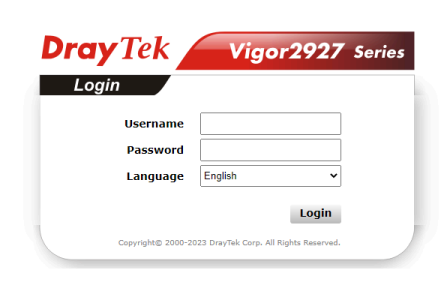
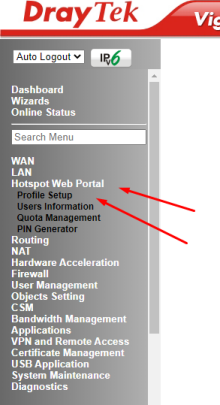
- Clique em Hotspot Web Portal → Profile Setup:
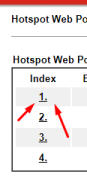
- Clique no 1. para editar a regra de Hotspot:
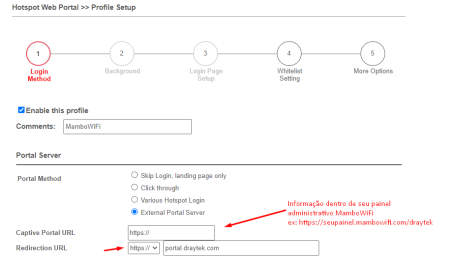
- Preencha os campos da seguinte forma:
- Enable this profile: Marcado
- Portal Method: External Portal Server
- Captive Portal URL: https://seupainel.mambowifi.com/draytek
- Redirection URL: https://portal.draytek.com
- Radius Server:
- Authentication Method: External RADIUS Server
- RADIUS MAC Authentication: Não marcar
- MAC Address Format: AA-BB-CC-DD-EE-FF
- Clique em Save and Next
- Whitelist Setting:
- NAT Rules:
- Always allow outbound connections from hosts: Deixe tudo marcado - Dest Domain:
- Index 1: Habilitado
- Destination Domain Whitelist: *.mambowifi.com
- Index 2: Habilitado
- Destination Domain Whitelist: *.draytek.com
- Dest. Port (Manter todas essas regras habilitadas):
- TCP: 8001
- UDP: 8001
- TCP/UDP: 8001
- TCP: 8043
- UDP: 8043
- TCP: 53
- UDP: 53
- More Options:
- HTTPS Redirection: Habilitado
- Captive Portal Detection: Habilitado
- Bypass: Desabilitado
- Landing Page After Authentication: Fixed URL:
seupainel.mambowifi.com/302
- Apllied Interfaces: Selecione as interfaces que irão receber o hotspot - Finish
3 Configurando RADIUS
- Volte ao Menu principal, em Hotspot Web Portal → Profile Setup novamente - Deixe o Hotspot Habilitado e clique em 1. abaixo de Index
- Em Authentication Method, clique em External RADIUS Server para abrir as configurações
- Vá para Applications → RADIUS/TACACS+
- Em External RADIUS preencha:
- Enable: Marcado
- Enable Accounting: Marcado
- Primary Server: 168.138.229.153
- Secret: Informação no seu painel
- Authentication Port: 1812
- Accounting Port: 1813
- Disconnect Message Port: 3799
- Interim Update Interval: 10
- Retry: 3
- Secondary Server:
- Secondary Server: 168.138.226.107
- Secret: Informação no seu painel
- Authentication port: 1812
- Accounting Port: 1813
- Disconnect Message Port: 3799
- Interim Update Interval: 10
- Retry: 2
- Clique em OK
Se houver alguma dúvida ou dificuldade, você pode entrar em contato com nosso suporte através do e-mail suporte@mambowifi.com informando sua dificuldade, número de telefone para contato e URL do painel administrativo.